



Primer · 18 min read · For utility, AEC, and field operations leaders · Updated September 2026
Build field processes fast with Fulcrum’s AI workflow builder
One field platform. Every field workflow.
The people who know the work can now build for it.
Trusted by field teams across utilities, construction, environmental services, engineering, government, and infrastructure.
3,000+
organizations worldwide
100+
countries with active field teams
Field-first
Offline work, GIS workflows & operational reporting
Guide to using an AI workflow builder for field operations
An AI workflow builder uses artificial intelligence to turn a described process, or workflow definition, into working software. A specialist explains the workflow, or hands over a document that already describes it. The system reads that input and generates the forms, logic, actions, and interfaces the workflow needs.
Field operations set a high bar for that generated software. It has to keep working with no signal, track exact locations, enforce validation, and meet enterprise security standards. Software at that level sits above what configuration alone can produce and below what justifies a full development project. That work often sits unbuilt, since teams rarely have a developer free to take it on.
What this guide covers
- What an AI workflow builder does, and the build, govern, and deploy standard behind it
- Where general‑purpose AI workflow builders stop, and what field conditions demand instead
- The work that sits between configuration and a development project
- How the description step works, and what a team can hand an AI workflow builder as input
- What an AI workflow builder needs underneath it to produce field‑ready software
- How AI‑assisted building stays inside enterprise security and permissions

Table of contents
- Build field processes fast with Fulcrum’s AI workflow builder
- Guide to using an AI workflow builder for field operations
- What an AI workflow builder does
- Where the alternatives to an AI workflow builder fall short
- The field workflows stuck between configuration and custom development
- What an AI workflow builder starts from
- What an AI workflow builder needs underneath it
- How an AI workflow builder stays governed
- Related resources
- Ready to improve the quality of your field data?
Key Insights
Key Takeaways
- The unbuilt work spans a range of complexity. None of it was impossible. It just needed a developer and a place in the queue.
- The input is something you already have. A sample report, a photo of a paper form, or notes from talking to field crews describes the process precisely enough to build from.
- The builder is the person who knows the work. Domain specialists build for their own workflows instead of filing a ticket and waiting.
- The foundation determines the output. Offline capture, spatial data, and validation have to arrive with the platform underneath.
- Governance travels with every build. What an AI workflow builder creates runs under the same roles and permissions an administrator already manages, with no separate access system to configure.
Chapter 1
What an AI workflow builder does
An AI workflow builder converts a plain-language description, or workflow definition, of a field process into working software using large language models (LLMs) and other AI models.
The person describing it knows the field process directly, an inspector, technician, or program lead. What comes back is the forms, validation logic, actions, and custom interfaces that workflow needs. The specialist reviews and approves the result before it reaches the field.
Turning a description into working software breaks down into three separate jobs:
- Building. Transform a documented field process into working software through no‑code configuration, low‑code automation, or AI‑assisted development, including the triggers and actions that move a workflow forward.
- Governing. Keep permissions, workflow history, versioning, and audit control with the administrators who own the platform.
- Deploying. Package a finished solution as a controlled workflow template and install it across teams, orgs, and regions in a single step.
The work that gets converted this way spans a wide range of difficulty. Some of it builds in minutes, through configuration alone. Some of it used to take a developer real time and now takes far less. Some of it never would have gotten built at all, and now it does.
All three run on top of a Field Operations Management (FOM) system: the record, the mobile app, and the field-grade capabilities already built for this kind of work. Read the Field Operations Management primer.
Describe the process, review the working tool, and deploy it on a foundation already built for the field.
Learn about building forms with the AI form builder and request early access.
Chapter 2
Where the alternatives to an AI workflow builder fall short
Five approaches to custom field tooling already exist. Each one carries its own piece of the job and needs something else for the rest.
| Approach | What it’s built for | Where it falls short |
|---|---|---|
| General‑purpose AI workflow builders | Fast generation of standalone web and mobile applications | The output arrives with no field foundation under it, so offline capture, spatial data, and enterprise security get rebuilt from zero |
Workflow automation platforms | Connecting systems and moving data between them through triggers and actions | The fieldwork itself still happens somewhere else, on a device those automations never reach |
| Low‑code business app platforms | Business process automation, office process apps, forms, and approval routing | Offline mode exists but takes real setup, and once offline, key pieces stop working, including field-level security and several connectors |
| Professional services engagements | Complex, one‑off builds delivered by the vendor’s own engineers | Weeks to months per request, and the queue grows with every team that needs something |
| In‑house custom development | Full control over a bespoke tool | Engineering time goes to storage, logins, sync, and permissions long before the unique piece gets built |
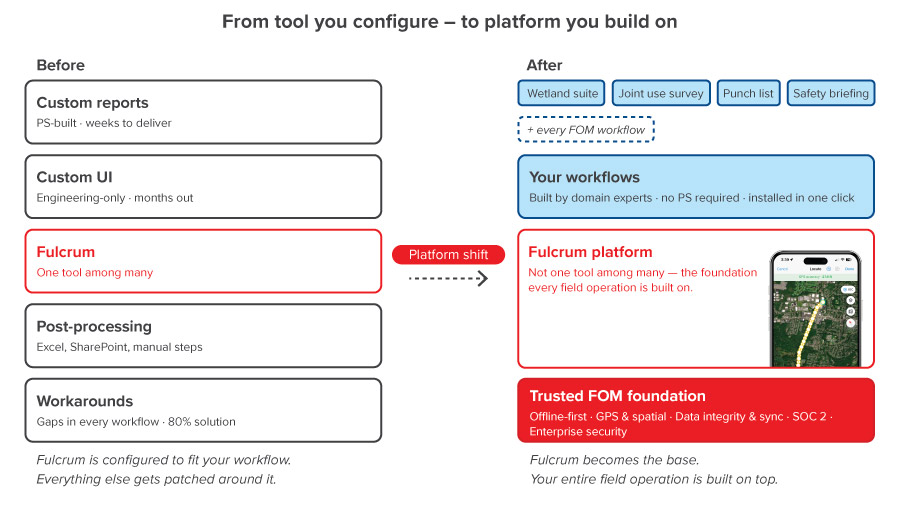
Security, sync, spatial data, and validation arrive with the Field Operations Management platform, which turns a months‑long engineering project into an afternoon.
An AI workflow builder inside a Field Operations Management platform starts where in‑house development usually ends. The infrastructure work in the table above, storage, logins, sync, permissions, already exists in the platform. What’s left for a team to build is the one piece specific to their workflow.
Chapter 3
The field workflows stuck between configuration and custom development
A lot of what a field team needs can be built without writing any code.
Someone sets up a form, adds a rule, builds a choice list, or lays out a report, all through menus and settings. That’s configuration.
Custom development sits at the other end. That’s a real project, with a developer, a budget, and a timeline, reserved for problems big enough to justify all three.
A wide range of field workflows sits between those two boundaries. They need a developer’s skill to build, but not enough to warrant a developer’s time or budget. That is where small automations, custom logic, and purpose-built interfaces tend to stay stuck in the queue.
What falls into that space isn’t a fixed list. It’s anything that needed real logic or a real interface and never got a developer’s time to build it. Three examples show the range:
- Logic that reaches outside the form. A record lands inside a mapped area, and the workflow populates the subarea name by querying a geographic information system (GIS) feature service. Populating a field this way means writing custom code to run the lookup.
- Interfaces no standard form produces. An interactive diagram of a room’s unfolded walls, floor, and ceiling lets a crew place outlets and conduit exactly where they sit. Electric utilities use views like that to capture what’s inside an underground vault.
- Better views of data already captured. A repeatable section renders as a table rather than a stack of entries, which changes how fast a reviewer reads it.
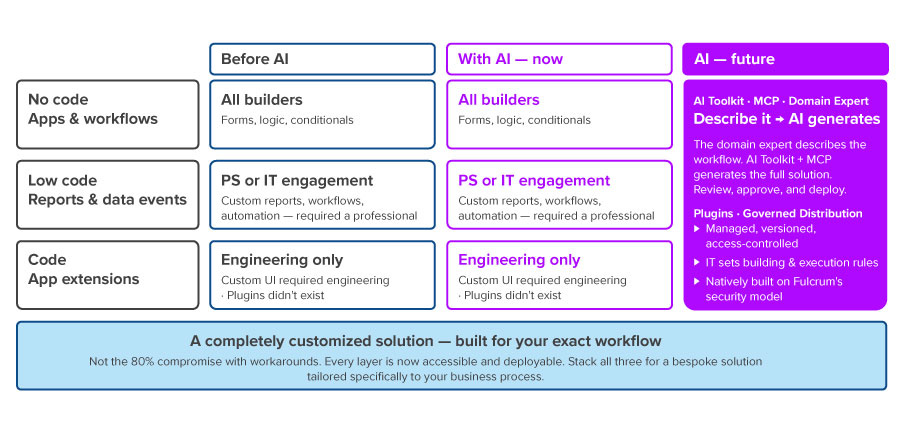
These three are just a sample. Every organization has its own list of workflows that went unbuilt because no developer had time for them, and that list is usually much longer than three items. The same pattern shows up whether the work was simple or nearly impossible to build by hand.
No workflow is too small — or too ambitious — for an AI workflow builder to take on.
Chapter 4
What an AI workflow builder starts from
Every AI workflow builder needs an input.
Natural language prompting lets LLMs interpret natural language descriptions alongside concrete source material. The most useful input is something the organization already has on hand:
- A sample of the report someone wants. Paste the example, and the body and style code for a matching report template comes back.
- A photo of a paper form. The form skeleton arrives with fields, types, and sections already laid out.
- A conversation with the field team doing the work. A described process becomes a first-pass app structure the specialist can correct.
A paper form, a sample report, and a field crew conversation all describe a process precisely. Each one existed before anyone considered building software from it. The description step reads the source material, and the specialist reviews and corrects what comes back.
A concrete source produces a more accurate result than a process explained from memory, since a form or a report captures every field, parameter, and step exactly as it’s used.
The best input to give an AI workflow builder is the form, report, or conversation that the team already uses.
Chapter 5
What an AI workflow builder needs underneath it
Generated software is only as field‑ready as the platform it runs on.
Six capabilities have to arrive with the platform rather than getting built alongside each new solution:
- Native geospatial data. Points, lines, and polygons, with industrial‑grade GIS support and basemap context.
- Offline‑first architecture. Capture continues with no signal, and sync resumes the moment a connection returns.
- Automatic synchronization and data integrity. Records stay consistent across devices, crews, and the office.
- Enterprise security and governance. SOC 2 controls, permissions, and access rules apply to every result by default.
- A consistent interface across devices. Generated interfaces run in the same mobile and web app the crew already uses.
- Bidirectional integration. Context comes in from GIS, Enterprise Asset Management (EAM), and work order systems through APIs, connectors, or a webhook, and finished work goes back out through the same governed integration layer.
This foundation produces a clean division of labor. IT keeps security, compliance, and integration, while the team closest to the problem builds only the piece unique to its workflow. Finally, the system of record on the other end receives finished field data without anyone building the capture tool.
Years of field operations knowledge sit in that foundation as well, encoded in how inspection, compliance, and asset workflows behave. A general-purpose AI workflow builder has to rebuild all of that knowledge from scratch, workflow by workflow.
Every workflow created by an AI workflow builder inherits offline architecture, industrial-grade GIS, data integrity, and enterprise security on day one.
Chapter 6
How an AI workflow builder stays governed
Letting more people build software applications raises considerations about control.
Three mechanisms answer those concerns:
- Managed control. Every result is installed, versioned, and access‑controlled, which retires the era of emailed scripts running unmonitored.
- Administrator permissions. IT sets who can build, who can install, and who can execute, at the level of the individual solution. Integration credentials and API keys stay under administrator control.
- Sanctioned architecture. Generated interfaces and logic run natively on the platform’s existing security policies and proven security model, so shadow IT never gets a foothold.
Governance also determines how far a good idea travels. One specialist defines a process correctly, and controlled distribution turns it into reusable workflow templates for every team and org that needs it. Domain expertise stops living in one person’s head and starts working as infrastructure.
An AI workflow builder extends platform capabilities securely without introducing institutional risk.
Get in touch
Frequently asked questions about AI workflow builders
What is an AI workflow builder?
An AI workflow builder is a tool that turns a plain-language description of a field process into working software. Instead of writing code or filling out a technical spec, a person describes the workflow, or hands over a document that already describes it, and the system generates the forms, logic, and interfaces that workflow needs.
Who can use an AI workflow builder?
Anyone who can describe a field process in plain language can use an AI workflow builder. No coding background is required to create a field workflow using an AI workflow builder.
What makes an AI workflow builder suitable for field operations?
Field conditions demand offline capture, GPS accuracy, spatial data, validation, and enterprise security. An AI workflow builder built on a Field Operations Management platform inherits all five automatically.
How does an AI workflow builder differ from workflow automation platforms?
Workflow automation platforms connect systems and move data between them when triggers fire and actions run. An AI workflow builder generates the field software a crew uses to do the work and includes offline capture, location accuracy, and a mobile interface.
What is a data event?
A data event is logic that runs when a record changes, with trigger configurations determining when it runs and parameters defining what data it evaluates, handling calculations, validation, lookups, and actions against outside systems. Data events cover rules a standard form can’t express on its own.What is a data event?
How is an AI workflow builder different from AI agents?
AI agents can take actions across tools or systems in pursuit of a defined task. An AI workflow builder focuses on turning a defined field process into governed software that crews use directly. AI agents can complement those workflows through broader agentic AI capabilities, while the workflow builder controls the field experience, permissions, versioning, and deployment.
What is an app extension?
An app extension is a custom interface embedded inside a field record, built with HTML, CSS, and JavaScript. App extensions cover work no standard form handles well, including interactive diagrams, specialized visualizations, and purpose-built capture screens.
Does an AI workflow builder create shadow IT?
An AI workflow builder doesn’t introduce shadow IT. Every result it produces is versioned and access-controlled, administrators set build and execution permissions, and everything runs on the platform’s existing security model.
How does safety fit into a workflow built with an AI workflow builder?
Safety checks can be built directly into a generated workflow, running automatically at the point of work as part of the job itself. That makes an AI workflow builder a genuine part of an integrated safety program.
What is Field Operations Management?
Field Operations Management is the discipline of running, recording, and closing out physical field work, from the first site visit to the final compliance record. A Field Operations Management system is the software companies use to standardize those workflows, keep field teams visible, and move finished records into office systems.
How does an AI workflow builder relate to Field Operations Management?
Field Operations Management supplies the record, the mobile app, and the field-grade foundation an AI workflow builder runs on. The AI workflow builder is how a team shapes that foundation into the exact workflow its operation needs.
How long does a custom field workflow take to build with an AI workflow builder?
Build time depends on how complex the workflow is, so there’s no fixed number. What changes is who does the work. A workflow that used to wait for a developer’s available time can now be built by the specialist who needs it.
Related resources

Customer Story
Alpine Energy brings field operations together on a single platform
Challenges Map book creation for field dispatch took up to three days of GIS staff time. Earth resistance testing required…
Customer Story
How Diverse Pipeline Services uses Fulcrum to protect gas infrastructure and win more work
Challenges Available software didn’t reflect how DPS operated in the field. In addition, forced rigid workflows didn’t match different clients…
Customer Story
Owen Electric Cooperative: Accelerating pole inspection workflows with Fulcrum
Challenges Surge in utility pole attachment requests overwhelmed disconnected and manual processes Disconnected and inconsistent inspection methods slowed workflows and…


Ready to improve the quality of your field data?
See how Fulcrum helps teams standardize field data collection, connect GIS workflows, and prepare field operations for AI-powered decisions.